By Yogesh Deshpande, Technical Director, Paladin Security
Microsoft 365 Security · Cloud Identity · Assume-Breach Assessment
The sign-in looked ordinary. The username was valid, the password was correct and the session reached Microsoft 365 through the same front door used by every other employee.
The attacker did not exploit Exchange Online or break into a Microsoft data centre. They acquired an identity—perhaps through phishing, password reuse, a stolen session token, device-code phishing or a compromised endpoint—and Microsoft 365 treated them as the user.
At that point, the important question is no longer how the credential was obtained. It is what the identity can reach, what it can change and whether anyone will notice.
That is where a stolen login becomes an attack path.
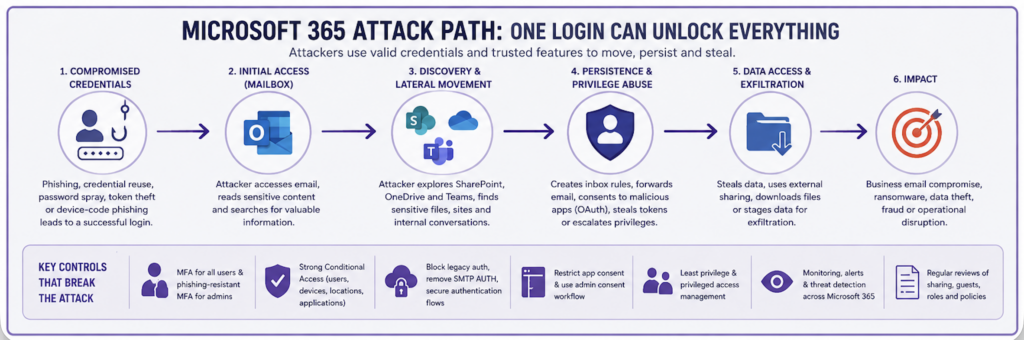
One identity, several control planes
Microsoft 365 is often discussed as an email platform. In practice, the same identity can provide access to Exchange Online, Teams, SharePoint, OneDrive, enterprise applications and business workflows. Entra ID also governs application consent, device trust, administrative roles and access policy.
A compromised employee may therefore expose much more than a mailbox. The account may be able to search project sites, read Teams conversations, retrieve shared files, invite guests, approve an application, reset another service through email or send convincing messages to colleagues and suppliers.
None of those actions requires malware. Most use normal product features, which is precisely why they can be difficult to distinguish from legitimate work.
Consider a finance employee whose credentials are captured through a convincing phishing page. The attacker signs in from an unmanaged device. Conditional Access does not require a compliant device, and the authentication method used by the account is susceptible to phishing. The session succeeds.
The mailbox provides the first map of the organisation: supplier names, invoice cycles, internal approvals and the people authorised to release payments. Search then leads to a Team used by finance and procurement. Its connected SharePoint site contains contracts, remittance details and previous invoices. The compromised user is not an administrator, but does not need to be. Their ordinary access is already commercially sensitive.
The attacker can now wait inside a genuine conversation, create a mailbox rule to obscure selected messages, or send a payment request from an account colleagues already trust. If alerts are absent or poorly triaged, each action may appear to be normal Microsoft 365 activity.
The mailbox is reconnaissance
Email gives an intruder context. A mailbox can reveal reporting lines, current projects, travel, suppliers, approval processes and the language people use with one another. It may also contain password-reset messages, authentication notifications and links into other business systems.
Inbox and forwarding rules deserve particular attention. A rule can move or delete security warnings, hide replies from a supplier, or forward selected mail. External automatic forwarding should therefore be disabled unless there is a defined need, while unusual rule creation and forwarding changes should generate useful alerts.
The defensive mistake is to treat mailbox access as the final impact. In many incidents it is the attacker’s index to the rest of the tenant.
Search follows existing permissions
Once inside, the attacker can use the same search and collaboration features as the user. Broad membership, inherited permissions, old sharing links and unmanaged guest accounts determine how far that search goes.
This is not necessarily a Microsoft 365 vulnerability. It is usually an access-governance problem. A project Team created for speed may remain open to a large group. A guest retained after a supplier engagement may still reach the connected site. An “Anyone” link may continue to work outside the organisation. A user’s OneDrive may contain information that was never intended to become a long-lived business record.
The practical test is simple: if this account were compromised today, which documents could it discover and export? Reviewing only the tenant-wide sharing setting will not answer that question. The review must include effective permissions on sensitive sites, Teams, libraries and files, as well as guest access and link types.
Consent can outlive the password
Credential theft is not the only way to obtain access. In an OAuth consent attack, a user is persuaded to grant an application delegated access to data such as mail, files or contacts. The application then calls Microsoft APIs with tokens issued for the granted permissions.
Changing the user’s password does not, by itself, remove an application’s consent grant. Incident response must identify the service principal and application, revoke the relevant grants and sessions, and investigate what the application accessed. The exact persistence available to an attacker depends on the permissions granted, token state and tenant controls, but the central point remains: application governance is part of identity security.
User consent should be limited to verified publishers and low-risk permissions that the organisation is prepared to accept. Requests outside that boundary should follow an administrator consent workflow. Existing enterprise applications and grants also need review; a safe policy for new consent does not remove risky access granted in the past.
Conditional Access decides whether a credential is enough
Multi-factor authentication is essential, but “MFA enabled” is not a useful description of the whole control environment. Coverage, policy scope and authentication strength matter.
A sound Conditional Access design should account for users, administrators, workload identities where applicable, cloud applications, device state, sign-in risk and authentication flows. Common weaknesses include excluded accounts, policies left in report-only mode, overly broad named locations, unmanaged devices with unrestricted access and privileged roles protected by authentication methods that remain phishable.
Device-code flow deserves explicit treatment. It supports devices with limited input, but it is also abused in phishing. Where there is no business requirement, the flow should be blocked through Conditional Access. Where it is required, its use should be narrowly scoped and monitored.
Policy changes must be staged carefully to avoid locking out administrators or disrupting essential services. Emergency access accounts should be excluded only where necessary, strongly protected, monitored and tested. An exclusion is not a control; it is a deliberately accepted exception that needs compensating safeguards.
Tokens change the incident
An attacker who steals a browser session or refresh token may be able to use an already authenticated context without repeating the original sign-in. MFA can therefore have worked correctly while the resulting session is later stolen and replayed.
This is why endpoint security, device compliance, session controls and token protection matter alongside authentication. Microsoft Entra Token Protection can bind supported sign-in session tokens to a device and reduce replay, but its effectiveness depends on supported clients, resources and deployment scope. It should be treated as one layer, not a universal answer to token theft.
During an incident, resetting a password is rarely sufficient. Responders may also need to revoke sessions, investigate registered authentication methods and devices, examine application consents, remove malicious mailbox rules, review role and policy changes, and determine which data was accessed.
Authentication exceptions deserve their own review
Advice about “legacy authentication” is often repeated without enough precision. Microsoft has removed Basic authentication from the principal Exchange Online protocols. SMTP AUTH is a separate consideration: the protocol can use OAuth, while Basic authentication for client SMTP submission is being retired according to Microsoft’s current timetable.
The assessment question is therefore not simply whether SMTP AUTH exists. It is whether client SMTP submission is needed, which mailboxes may use it, which authentication method is permitted and whether the exception is monitored. Microsoft recommends disabling SMTP AUTH at organisation level and enabling it only for mailboxes that genuinely require it.
The same discipline applies to service accounts, older clients and Conditional Access exclusions. Attack paths frequently survive in exceptions that were created for a legitimate reason and never revisited.
Privilege makes the path shorter
A compromised administrator can turn an account incident into a tenant incident. Standing Global Administrator assignments, shared administrative accounts and daily-use accounts with privileged roles make that outcome more likely.
Administrative duties should use separate accounts, strong phishing-resistant authentication and least-privileged roles. Eligible, time-bound activation through Privileged Identity Management can reduce standing access where licensing supports it. Role assignments, emergency access accounts, third-party administrators and service principals with powerful application permissions should all be reviewed regularly.
The objective is not merely to reduce the number of Global Administrators. It is to make privileged access deliberate, short-lived, attributable and visible.
Can the tenant show what happened?
Prevention will sometimes fail. The tenant must then produce evidence quickly enough to contain the incident.
Useful detection covers risky and atypical sign-ins, suspicious inbox or forwarding rules, unusual application consent, privilege changes, new credentials added to applications, changes to Conditional Access, anomalous guest invitations and unexpected volumes of file access or download. Which detections and retention periods are available depends on the organisation’s Microsoft licensing and connected security tooling, so monitoring design must be checked against what is actually deployed.
An alert is only useful if it reaches an owner, contains enough context to investigate and is exercised before an incident. An assume-breach assessment should therefore generate safe representative activity and confirm what defenders can see and not merely confirm that audit logging is switched on.
Assess the path, not just the settings
A meaningful Microsoft 365 assessment begins with a low-privileged identity and follows its effective access. It asks:
– Which applications and data can the account reach?
– Does Conditional Access contain access from an unmanaged or risky context?
– Can the user grant application consent, create forwarding rules or invite guests?
– Do SharePoint, Teams and OneDrive permissions expose information beyond the user’s role?
– Can privilege or persistence be established through existing administrative and application relationships?
– Which actions generate alerts, and can the organisation investigate them?
The result should be a set of connected attack paths, not a collection of isolated configuration findings. A broad sharing setting may appear moderate on its own. Combined with weak device controls, sensitive site membership and limited monitoring, it can explain how one stolen session becomes a material data breach.
The attacker does not need to defeat Microsoft 365. They need Microsoft 365 to accept an identity and then provide the access already attached to it.
The security outcome is determined by everything that happens after that first login.
The goal is not to make Microsoft 365 unusable.
The goal is to make compromise harder, lateral movement slower, persistence weaker, data exposure smaller and detection faster.

Let’s Connect!
Ready to Take the First Step Toward Cyber Security transformation?
You’re in the right place.